AI Toolbox (formerly ChatGPT Toolbox) is a browser extension that adds organization, search, and export tools across multiple AI chat platforms, including ChatGPT, Gemini, Claude, and Grok. It provides productivity enhancements such as folders, smart tags, full-text search, message bookmarking, prompt libraries, and bulk export, aimed at users who manage many AI conversations.
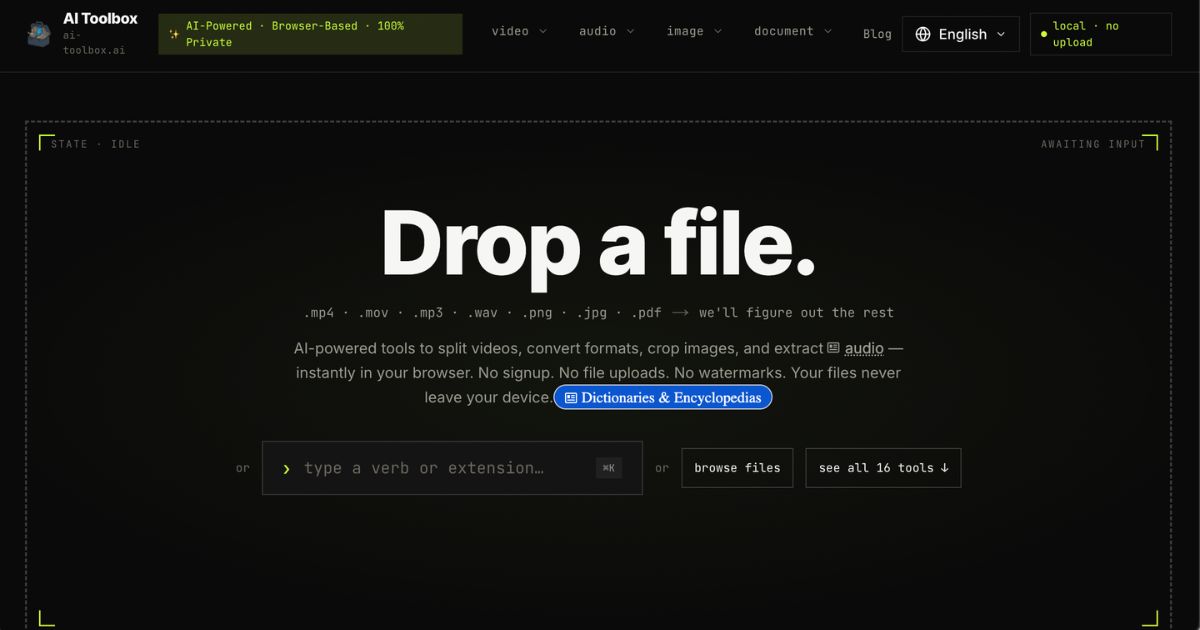
Separately, AI Toolbox‘s official site (ai-toolbox.ai) offers a collection of in-browser media tools for video, audio, image, and document files. These enable tasks like video trimming, format conversion, GIF creation, audio transcription, image OCR, and document merging—all done locally without uploads, sign-ups, or watermarks.
Key Features
Here are the main capabilities of AI Toolbox, grouped by purpose. All are based on verified information.
1. Chat and prompt management across AI platforms
- Organize conversations into folders and subfolders, with smart tags for sorting.
- Full-text search across entire history (titles and message content) with filters (by role, date, exact match) to locate relevant content quickly.
- Saved prompts and prompt chaining (using shortcuts) for repeated tasks.
- Bulk export of chats (multiple formats: TXT, JSON, Markdown, PDF, ZIP) and ability to bookmark messages or label key turns.
2. Media-and file-based tools (from ai-toolbox.ai)
- Sixteen tools covering video (splitter, converter, compressor, merger, flipper, rotator, trimmer), audio (extractor, splitter, transcription), image (cropper, converter, OCR), and document tools (PDF merger, archive converters, unzip).
- Operations are fully client-side via WebAssembly—no file uploads, no data leaving the device; privacy by design.
3. Privacy and security
- For chat-platform features, conversation content is stored locally in the user’s browser and never permanently stored on AI Toolbox‘s servers.
- When cloud sync is enabled (optional), only non-content metadata—e.g. folder names, prompt content, chat/message IDs, labels—is uploaded in encrypted form; AI Toolbox cannot read any of it.
- GDPR compliance, with documented user rights (access, deletion, portability).
Who Is It For?
AI Toolbox is likely to be most useful for:
- Freelancers, consultants, marketers, researchers who work in multiple AI tools and accumulate many chat histories—they need better organization and search capabilities.
- Team environments where collaboration and standardized workflow tools help, especially via the Teams plan with shared prompt libraries and usage analytics.
- Professionals handling media content (videos, images, audio, etc.) who want quick edits or conversions without installing dedicated software and with strong privacy protections.
It is less relevant for those who need real-time collaboration inside AI chats, integrating external APIs, or features outside local browser-based operations.
Pricing
Here are the clearly stated pricing tiers and what they offer. All prices in US dollars, based on official information as of summer 2026.
| Plan | Features / Limitations | Price |
|---|---|---|
| Free | Basic version: limited number of folders (2), saved prompts (2), search results per query (5), bookmarks, exports (limited), works across ChatGPT, Gemini, Claude, Grok. | $0 forever—no signup needed. |
| Premium Monthly (per module) | Unlimited folders, prompts, search, bulk exports, smart tags etc. for one AI platform. Cancel anytime. | ~$9.99/month per module. |
| Premium Lifetime (per module) | Same features as monthly premium, one-time payment; locked-in price and lifetime updates. | ~$99 one-time per platform. |
| All Access Lifetime | Premium features across all current modules (ChatGPT, Gemini, Claude, Grok) and future modules; one purchase. | ~$199 one-time. |
| Teams | Designed for 2+ users; includes all premium features, team-level management, shared libraries. | ~$15 per seat/month, or ~$12/seat/year (when billed annually), minimum 2 seats. |
Note: Refund policy offers 14-day money-back guarantee on paid plans.
Final Thoughts
AI Toolbox combines significant organizational and productivity enhancements for professionals managing many AI conversations with strong commitments to privacy and cross-platform support. Its modular structure allows users to pay only for what they use (single AI platforms) or invest in broader access across platforms with the All Access option.
The media tools available via ai-toolbox.ai are especially useful for lightweight editing tasks—video, audio, image, and document manipulations—without the burden of uploads or accounts. That makes them suitable for quick tasks, minimizing risks around data exposure.
If your work involves handling many AI chat sessions, managing content across different platforms (ChatGPT, Gemini, Claude, Grok), or frequently dealing with media files locally, AI Toolbox offers a well-considered feature set. For organizations, the Teams plan adds collaboration and oversight.
However, if your needs extend to real-time collaboration, shared chat threads, integrations with external tools, or server-side processing, then AI Toolbox will likely complement rather than replace other tools in your stack.
If you like, I can also compare AI Toolbox with major alternatives for business users so you can see trade-offs more clearly.
Visit ai-toolbox.ai for more.